How to Install Free SSL Certificate on Nginx/Apache (HTTPD)
Summary: Install Free SSL Certificate on Nginx/HTTPD using OpenSSL and Let’s Encrypt
📘 Table of Contents
🧠 Introduction to HTTPS & Free SSL Certificate
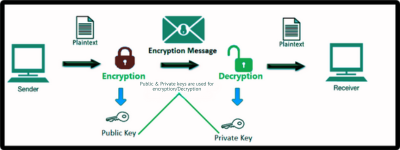
HTTPS (HyperText Transfer Protocol Secure) encrypts data exchanged between a browser and a server using SSL/TLS certificates. This ensures:
- Data privacy
- Authentication
- Trust for visitors
Google even prioritizes HTTPS-enabled websites in search results. If you’re hosting a website without SSL, you’re missing out on both security and SEO benefits.
✅ Benefits of Using Free SSL Certificates
- 💸 100% Free via providers like Let’s Encrypt
- 🔐 Secure communication
- 🌍 Multi-domain support using SAN (Subject Alternative Name)
- ♻️ Auto-renewable every 90 days
- 🧠 Learning opportunity for DevOps & SRE professionals
⚙️ Step-by-Step: Installing Free SSL Certificate on Nginx/Apache
1. Install Required Tools
Install OpenSSL and Certbot:
Ubuntu/Debian:
sudo apt update
sudo apt install openssl certbot python3-certbot-nginx -y
RHEL/CentOS:
sudo yum install openssl mod_ssl epel-release -y
sudo yum install certbot python3-certbot-apache -y
2. Create OpenSSL Config with SAN Support
Create a file called openssl.cnf with SAN entries.
[ req ]
default_bits       = 2048
prompt             = no
default_md         = sha256
req_extensions     = req_ext
distinguished_name = dn

[ dn ]
C = US
ST = California
L = San Francisco
O = CICD Trail
OU = DevOps
CN = example.com

[ req_ext ]
subjectAltName = @alt_names

[ alt_names ]
DNS.1 = example.com
DNS.2 = www.example.com
DNS.3 = api.example.com
3. Generate Private Key & CSR with SAN
openssl req -new -nodes -out example.csr -newkey rsa:2048 -keyout example.key -config openssl.cnf
This will create:
example.csr– Certificate Signing Requestexample.key– Private key
4. Get Free SSL Certificate from Let’s Encrypt
For Nginx:
sudo certbot --nginx -d example.com -d www.example.com -d api.example.com
For Apache (HTTPD):
sudo certbot --apache -d example.com -d www.example.com -d api.example.com
Certbot will auto-configure your server in most cases.
5. Configure Nginx or Apache for free SSL certificate
🔹 Nginx Example:
server {
    listen 443 ssl;
    server_name example.com www.example.com api.example.com;

    ssl_certificate /etc/letsencrypt/live/example.com/fullchain.pem;
    ssl_certificate_key /etc/letsencrypt/live/example.com/privkey.pem;

    location / {
        proxy_pass http://localhost:3000;
    }
}
🔹 Apache Example:
<VirtualHost *:443>
  ServerName example.com
  ServerAlias www.example.com api.example.com

  SSLEngine on
  SSLCertificateFile /etc/letsencrypt/live/example.com/fullchain.pem
  SSLCertificateKeyFile /etc/letsencrypt/live/example.com/privkey.pem

  DocumentRoot /var/www/html
</VirtualHost>
6. Test SSL Configuration
Use these tools:
- SSL Labs Test
curl -Iv https://example.comopenssl s_client -connect example.com:443
🔁 Bonus Tips: Auto-Renew & Hardening SSL
Auto-Renewal:
sudo crontab -e
# Add this line
0 0 * * * /usr/bin/certbot renew --quiet
SSL Hardening:
- Disable weak protocols: TLSv1, TLSv1.1
- Use modern ciphers
- Implement HSTS headers
Refer: Mozilla SSL Config Generator
🛠️ Troubleshooting Common Issues
| Problem | Fix |
|---|---|
| Port 443 not open | Open it via firewall (e.g. ufw allow 443) |
| Certbot not found | Install latest version using snap or package manager |
| Invalid domain | Ensure DNS A record is pointing correctly |
| Nginx/Apache not reloading | Check config using nginx -t or apachectl configtest |
🎯 Related articles for you:
- Setup Nginx Reverse Proxy
- strace Command: Debug Your SSL Setup
- Contact Us for DevOps Support
- 📩 Subscribe to our newsletter for more DevOps, SRE & Cloud tutorials!
🔗 External References
✅ Conclusion & Final Thoughts
Installing SAN-enabled Free SSL certificate on Nginx or Apache is now easier than ever. By securing your websites with HTTPS, you not only boost user trust but also improve search engine rankings.
Whether you’re a beginner or an advanced DevOps engineer, this guide equips you with everything you need to get started securely and confidently.
💬 What Next?
👍 If this guide helped you, drop a comment below or share it with your team.
🔧 Need help with SSL setup? Contact CICDTrail Support