
To solve Ubuntu apt update GPG error, let’s first clean up system:
$ sudo apt-get clean
Backup:
$ sudo cp -a /var/lib/apt/lists /tmp Remove Lists:
sudo rm -r /var/lib/apt/lists/* Rebuild Package list:
First run this command:
$ sudo mkdir -p /var/lib/apt/lists/partial
Second command:
$ sudo apt-get clean
And finally,
$ sudo apt update
At this point, there is possibility of new errors (in addition to Ubuntu apt update GPG error), such as:
W: GPG error: http://security.ubuntu.com/ubuntu bionic-security InRelease: The following signatures couldn't be verified because the public key is not available: NO_PUBKEY 3B4FE6ACC0B21F32
E: The repository 'http://security.ubuntu.com/ubuntu bionic-security InRelease' is not signed.
N: Updating from such a repository can't be done securely, and is therefore disabled by default.
N: See apt-secure(8) manpage for repository creation and user configuration details.
To fix above errors including Ubuntu apt update GPG error, we need to download key from keyserver.ubuntu.com and add to trusted set of keys:
$ sudo apt-key adv --keyserver keyserver.ubuntu.com --recv-keys 3B4FE6ACC0B21F32
Warning: apt-key is deprecated. Manage keyring files in trusted.gpg.d instead (see apt-key(8)).
Executing: /tmp/user/0/apt-key-gpghome.JJHaZlKIWR/gpg.1.sh --keyserver keyserver.ubuntu.com --recv-keys 3B4FE6ACC0B21F32
gpg: key 3B4FE6ACC0B21F32: public key "Ubuntu Archive Automatic Signing Key (2012) <[email protected]>" imported
gpg: Total number processed: 1
gpg:               imported: 1
Ouch, new warnings:
W: http://security.ubuntu.com/ubuntu/dists/bionic-security/InRelease: Key is stored in legacy trusted.gpg keyring (/etc/apt/trusted.gpg), see the DEPRECATION section in apt-key(8) for details.To resolve Ubuntu apt update GPG error, now let’s try move keys from legacy trusted.gpg to trusted.gpg.d:
sudo mv /etc/apt/trusted.gpg /etc/apt/trusted.gpg.d/Let’s try update again:
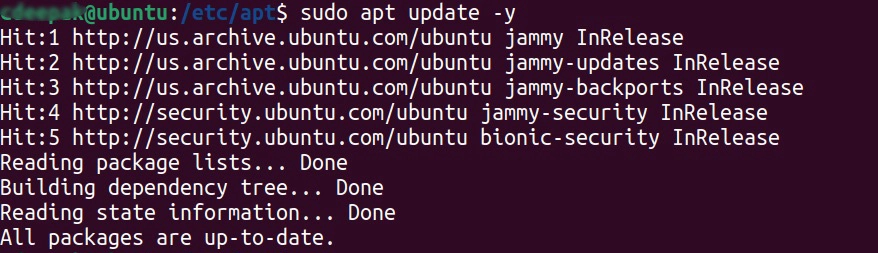
And finally, there are no more Ubuntu apt update GPG errors.
Hurray!!
🙂
Quick Note: Please refer to Official Ubuntu Documentation if you are facing this issue on Ubuntu apt update GPG error.
📩 Stay ahead with expert insights on JavaScript, DevOps, and SRE trends.
💼 Interested in collaborations, partnerships, or sponsorships? Let’s connect! 🚀




Pingback: Ubuntu 22.04 LTS Jammy Jellyfish: Upgrade – cicdTrail Blogs
Thanks! I just update today and had this very same issue, and your solution fixed it. You are the man! 🙂
Awesome news Fenix, glad to know article helped!
truly easy, thank you i’ve learned something new today! Problem solved!!
Wow you just done it with this solution, thank you.
Excellent stuff here. Lot of attempt you put to create step by step solution.
Fixed my issue. Superb blog! Thanks
you can reach out at [email protected]